TL;DR
- As student and tutor numbers grow, manual systems cause errors, missed sessions, payment delays, and operational stress. These are signs that you need an advanced tutoring software.
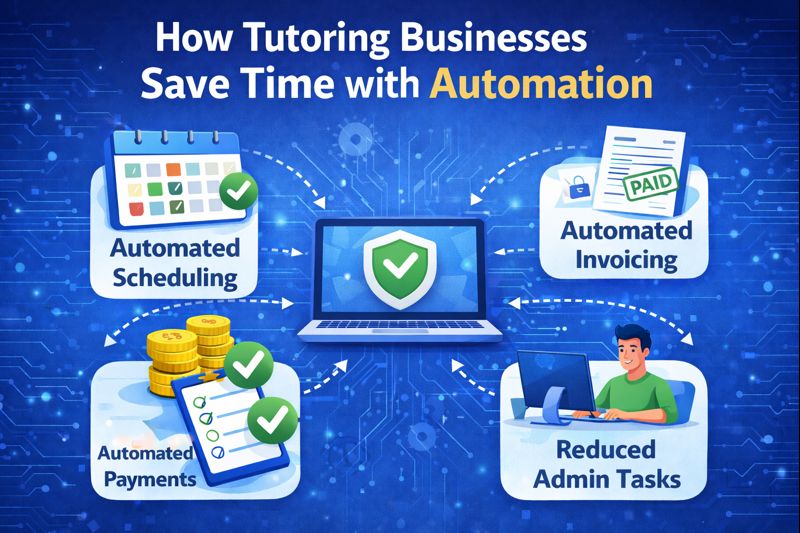
- Two-way calendar sync keeps tutor and student schedules aligned and reduces missed sessions.
- Automated invoicing removes manual billing and prevents payment delays.
- Tutoring software automation removes repetitive admin tasks without affecting how tutors teach, eliminating burnout.
Introduction
Running a tutoring business has changed dramatically over the last 5 years. What once involved a tutor, a notebook, and a fixed weekly schedule has evolved into a complex operation that often includes multiple tutors, students across time zones, online and in-person sessions, digital payments, and continuous communication with parents and learners.
As tutoring businesses grow, one challenge becomes increasingly clear. Teaching itself is rarely the problem. Administration is.
From scheduling lessons and collecting payments to tracking attendance and managing tutors, administrative work can quietly consume a significant portion of admin work. This is why more tutors and tutoring businesses around the world are searching for time-saving automations in a tutoring software.
This blog explores what automation really means in the context of tutoring, why it has become essential for modern tutoring businesses, and how the right tutoring software can remove hours of manual work without compromising teaching quality.
Why Administrative Work Slows Down Tutoring Businesses
Most tutors and tutoring businesses start their journey focused entirely on students. In the early stages, administrative tasks feel manageable. A shared calendar handles scheduling. Messages are sent manually. Payments are tracked in spreadsheets or basic accounting tools.
The problem begins when scale enters the picture.
Adding more students increases scheduling complexity. Adding tutors introduces coordination challenges. Offering group sessions or recurring programs multiplies communication needs. Suddenly, tutoring business owners spend evenings sending reminders, reconciling payments, and fixing scheduling errors.
This administrative overload leads to several common issues across tutoring businesses globally.
First, time is diverted away from lesson planning and student engagement. Second, manual processes increase the likelihood of mistakes such as missed sessions, incorrect invoices, or delayed payments. Third, growth becomes stressful instead of sustainable.
Research and industry discussions consistently show that service-based education businesses struggle most with operational inefficiencies rather than demand. This is where automation becomes not just helpful, but necessary.
What Automation Means in Tutoring Software
Automation in tutoring software refers to the use of systems that perform routine operational tasks automatically based on predefined rules and real-time data.
This does not mean removing human oversight or decision-making. Instead, it means removing repetitive manual steps that do not require creative or instructional input.
In tutoring contexts, automation typically applies to operational workflows rather than teaching itself. Examples include automatically confirming bookings, generating invoices after sessions, recording attendance, or notifying students about upcoming lessons.
Well-designed automation works quietly in the background. Tutors and students often notice only that things run more smoothly. Sessions start on time. Payments are clear. Communication is consistent.
Importantly, automation in tutoring software is most effective when it is integrated. Isolated automation tools create fragmented workflows. Integrated systems reduce friction across the entire tutoring operation.
Core Areas Where Automation Saves the Most Time
Not all automations are equally valuable. For tutors and tutoring businesses, certain areas consistently deliver the highest time savings. Below are some of the standout automation features that are widely used.
1. Automated Scheduling and Bookings
Scheduling is one of the most time-consuming tasks in tutoring businesses worldwide. Coordinating availability between tutors and students across different time zones adds further complexity.
Tutoring software with automated tutor scheduling allows students or parents to book sessions based on real-time tutor availability. Once a booking is made, calendars are updated automatically, and confirmations are sent without manual intervention.
Scheduling automation in a modern tutoring software goes beyond simply displaying availability. One of the most valuable features is two-way calendar sync.
For example, when a tutor connects their Google or Outlook calendar to a tutoring platform, availability is updated automatically in real time. If a tutor blocks personal time on their calendar, that slot immediately becomes unavailable for student bookings. Similarly, when a student books a tutoring session through the platform, the session is automatically added to the tutor’s external calendar.
This two-way sync eliminates double bookings and removes the need for tutors to manually update multiple calendars. For global tutoring businesses operating across time zones, the system also automatically adjusts session times based on the student’s location, reducing confusion and missed sessions.
As a result, scheduling becomes a self-running process rather than a daily administrative task.
2. Automated Payments and Invoicing
Payment management is another major source of manual work for tutors. Manually generating invoices, tracking payments, and following up on overdue balances consumes time and creates friction with clients.
Automated payments in tutoring software ensure that billing is directly linked to actual tutoring activity and allow invoices to be generated automatically based on completed sessions, packages, or subscriptions. Payment reminders are triggered automatically, and records are updated in real time.
For instance, when a tutoring session is marked as completed, the system can automatically generate an invoice based on predefined pricing rules. If the student is on a package or subscription, the session is deducted automatically. If payment is due, an invoice and payment link are sent without any manual input from the tutor or admin team.
This improves cash flow consistency and reduces the mental load associated with financial tracking. It also creates a more professional experience for students and parents.
In cases of recurring sessions, invoices can be generated weekly or monthly, and payment reminders are triggered automatically if a balance remains unpaid. This removes the need for tutors to chase payments and reduces the risk of revenue leakage.
Multiple tutoring industry platforms and guides emphasise automated billing and invoicing as essential for scaling tutoring operations efficiently.
3. Automated Attendance and Session Tracking
Attendance tracking is critical for billing accuracy, reporting, and accountability. Manual attendance tracking often relies on tutors remembering to update records after sessions, which can lead to errors.
Automated attendance systems capture participation data during or immediately after sessions. Session duration, attendance status, and completion data are logged automatically. Attendance automation ensures accurate records without relying on tutors to manually update logs.
This information can then feed directly into invoices, tutor payouts, and performance reports. The result is less duplication of work and more reliable data. For example, when a live tutoring session starts through an integrated virtual classroom, the system automatically records attendance and session duration. If a student joins late or leaves early, this information is captured automatically.
Once the session ends, attendance data is stored and reflected across reports, billing, and tutor payouts. This ensures consistency across the entire system and prevents disputes over attended sessions or billed hours.
For tutoring businesses offering large volumes of live sessions, automated attendance tracking can save several hours of administrative work each week.
Education technology research consistently highlights automated tracking as a key driver of operational efficiency in learning environments.
4. Tutor Management and Payment Automation
As tutoring businesses grow, managing tutors becomes increasingly complex. Assigning sessions, tracking hours worked, calculating earnings, and preparing payouts can become a major administrative burden.
Tutor payout automation connects session delivery directly to compensation. Automation links tutor activity directly to session data. Completed sessions automatically contribute to tutor earnings reports. Payment calculations are handled systematically rather than manually.
For instance, when a tutor completes a session, the system automatically logs the session under the tutor’s account. At the end of a payout cycle, the platform calculates total earnings based on completed sessions, hourly rates, or commission structures.
This transparency benefits both tutors and business owners. Tutors gain clarity over schedules and earnings, while businesses reduce payroll errors and admin overhead.
This removes the need for manual payroll calculations and reduces errors. Tutors can also view their completed sessions, upcoming schedule, and earnings in one place, improving transparency and trust. For tutoring businesses managing multiple tutors across regions, this automation significantly simplifies operations.
Tutoring software comparisons frequently note tutor management automation as a differentiator between basic tools and scalable platforms.
5. Automated Communication and Reminders
Missed sessions and miscommunication are common issues in tutoring businesses. Manual reminders are time-consuming and inconsistent. Communication automation ensures consistent engagement without manual follow-ups.
Automated communication ensures that reminders, confirmations, and updates are sent automatically at predefined times. This improves attendance rates and reduces no-shows.
Parents and students receive consistent information without tutors needing to send individual messages. This creates a more reliable and professional experience.
For example, students can receive automated reminders every 24 hours and even 1 hour before a scheduled session. Tutors are notified instantly if a session is rescheduled or cancelled. Parents can receive automated updates about attendance or session completion.
These notifications are triggered automatically based on events within the system, rather than manual messages. This reduces no-shows, improves accountability, and ensures all stakeholders stay informed.
Industry articles on tutoring software automation consistently highlight automated reminders as a simple but powerful time saver.
Why Traditional Tutoring Software Platforms fall short for Tutoring Automation
Many tutors initially turn to traditional learning management systems when searching for automation. While LMS platforms excel at course delivery and content management, they are often not designed for live tutoring operations.
Traditional LMS automation focuses on content release schedules, quizzes, and learner progress within structured courses. Tutoring businesses operate around live sessions, flexible scheduling, and ongoing client relationships.
As a result, tutors using generic LMS platforms often rely on additional tools for scheduling, payments, and communication. This creates fragmented workflows rather than true automation.
Course platforms are also typically designed for one-to-many instruction rather than multi-tutor live delivery. Tutor management, session-based billing, and attendance tracking are often limited or entirely manual.
This mismatch explains why many tutoring businesses outgrow generic LMS solutions and search specifically for tutoring software automation.
How purpose built Tutoring Software addresses these gaps
Purpose-built tutoring software approaches automation from an operational perspective rather than a content-first perspective.
Instead of treating sessions as secondary to courses, tutoring-focused platforms treat sessions as the core unit of activity. Scheduling, attendance, payments, tutor payouts, and reporting are all connected to session data.
Wise, for example, is designed around live tutoring workflows rather than static course delivery. Automation is embedded across scheduling, attendance tracking, payment management, and tutor coordination.
When a session is completed, multiple processes update automatically without manual input. This reduces duplication of work and ensures operational consistency.
By focusing on tutoring operations rather than generic learning delivery, platforms like Wise align automation with the realities of tutoring businesses operating globally.
Automation as a growth enabler for Global Tutoring Businesses
Automation is not just about saving time today. It is about enabling sustainable growth tomorrow.
For global tutoring businesses serving students across regions, automation supports scalability by handling time zones, recurring schedules, and standardised communication.
As student volume increases, automated systems maintain consistency without requiring proportional increases in administrative staff. This improves profit margins and operational resilience.
Automation also improves the student and parent experience. Predictable communication, clear billing, and reliable scheduling build trust and retention.
Across the tutoring industry, businesses that invest early in automation are better positioned to scale without burnout.
Choosing a Tutoring Software With Automation in Mind
When evaluating tutoring software, tutors and business owners should focus on operational workflows rather than feature checklists.
Key questions include whether the software reduces the tasks that are currently done manually every week. Scheduling, payments, attendance, communication, and tutor management should work together seamlessly.
It is also important to assess whether automation supports the business model, whether one-on-one tutoring, group sessions, or hybrid formats. Finally, automation should feel intuitive rather than overwhelming. The best systems remove friction rather than introducing complexity.
Time-saving automations in tutoring software are no longer optional for modern tutoring businesses. They are a foundational requirement for sustainable operations. Automation does not replace teaching. It protects it. By removing repetitive administrative work, tutors regain time, focus, and energy to deliver better learning experiences.
For tutors and tutoring businesses searching globally for ways to automate their operations, the key lies in choosing software designed specifically for tutoring workflows rather than adapting tools built for other purposes.
As the tutoring industry continues to expand worldwide, automation will remain one of the most important drivers of efficiency, scalability, and long-term success.
FAQs (Frequently asked questions)
1. What does automation in tutoring software actually mean?
Automation refers to using software to handle routine admin tasks like scheduling sessions, sending reminders, generating invoices, tracking attendance, and managing tutor payouts without manual work.
2. Will automation affect how tutors teach or interact with students?
No. Automation only manages administrative workflows. Teaching, lesson delivery, and student engagement remain entirely in the tutor’s control.
3. How does two-way calendar sync help tutoring businesses?
Two-way calendar sync updates tutor availability in real time, adds sessions automatically to calendars, and prevents double bookings, missed sessions, and time zone errors.
4. Can tutoring software automate payments and invoicing?
Yes. Invoices can be generated automatically after sessions, payment reminders sent on time, and payment status updated without manual follow-ups.
5. How does automation reduce missed sessions and no-shows?
Automated reminders and notifications can be sent before sessions and when changes occur, keeping tutors, students, and parents informed and reducing no-shows.
6. Is automation useful for small tutoring businesses?
Yes. Automation saves time from day one and prevents admin overload as student and tutor numbers grow, making it easier to scale efficiently.