TL;DR
- If your tutoring business relies on WhatsApp, spreadsheets, and manual follow-ups to manage schedules, you are already losing time, money, and trust without realising it.
- As student numbers and tutor teams grow, manual scheduling leads to double bookings, missed sessions, constant reschedules, tutor frustration, and admin overload.
- One-way calendar integrations (where sessions only show on Google Calendar) create a false sense of organisation but still allow clashes, last-minute changes, and availability errors.
- Automated scheduling with self-serve booking, institute calendars, two-way calendar sync, session reminders, and clear cancellation rules removes scheduling from human memory and makes operations reliable.
- Tutoring businesses that scale smoothly don’t manage schedules better, they replace manual scheduling with systems where booking, availability, reminders, and reschedules run automatically in the background.
Introduction: Why scheduling becomes disorganised as tutoring businesses grow
In most tutoring businesses, scheduling is treated as an administrative task. Something that needs to be handled, but not something that needs to be designed. In the early stages, this feels reasonable. A small number of students, one or two tutors, and flexible communication are enough to keep things running. Sessions are booked manually, changes are shared over messages, and tutor availability is tracked in people’s heads or basic spreadsheets. The problem is that this approach does not break suddenly. It breaks gradually.
As student numbers increase and tutor teams expand, scheduling becomes more complex without the system ever being upgraded. Parents reschedule. Tutors change availability. Sessions move across evenings, weekends, and holidays. Admin teams spend more time checking, reconfirming, and fixing. Tutors start experiencing clashes. Parents start seeing inconsistencies. Small mistakes become frequent, and each one takes time, energy, and patience to resolve.
This is the stage where many tutoring businesses feel busy but not in control. Teaching may be strong. Demand may be growing. But operations start to feel heavy. The schedule of the business begins to rely on memory, constant follow-ups, and people being careful. And the harder the team works, the clearer it becomes that effort alone is not enough to keep things reliable.
This is where automated scheduling becomes essential. Not as a convenience, and not as a nice-to-have feature, but as an operational infrastructure. When booking, tutor availability, session reminders, and cancellation rules are handled by systems instead of people, coordination stops being a daily problem.
Instead of:
- Admins constantly checking availability with the tutor,
- Tutors messaging changes to admins or even students/parents,
- Parents/Students waiting for confirmation,
- And schedules being held together by the single effort of the admin.
Automated scheduling on the other hand creates structure.
It replaces manual coordination with:
- Self-serve booking,
- Centralised institute calendars,
- Two-way calendar sync,
- Automated reminders,
- Consistent reminder and cancellation policies.
In the next sections, we break down these five pillars of automated scheduling in tutoring businesses and show how they work together to remove chaos, reduce admin load, and make tutoring operations reliable at scale.
The 5 Pillars of Automated Scheduling every Tutoring Business needs
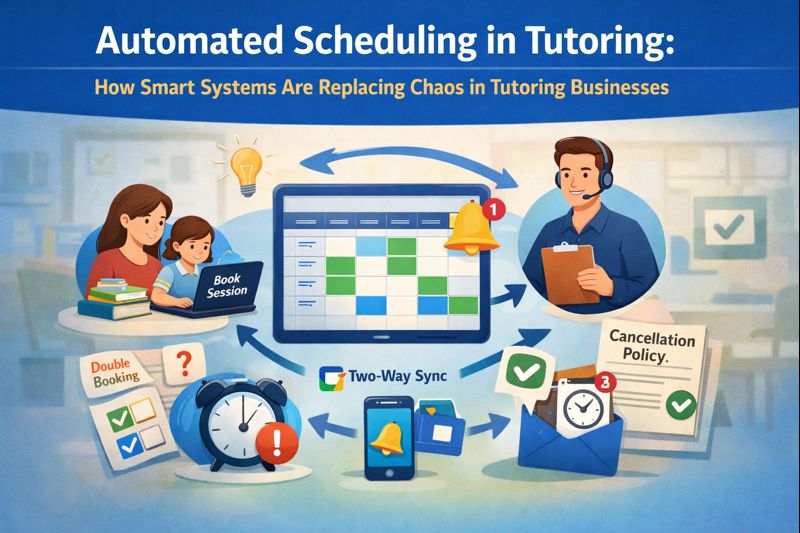
Automated scheduling is not one feature or one tool. It is a combination of systems that work together to remove chaos from running a tutoring business. When these five pillars are in place, scheduling stops being a problem and starts becoming an advantage.
- Self-serve booking – Allows parents and students to book sessions themselves without waiting for replies, reducing delays and lost enquiries.
- Tutoring centre calendar – Gives you one clear view of all tutors, students, and sessions so you can actually see how your business is running. Helps with end to end tutoring business calendar management.
- Two-way calendar sync – Keeps tutor availability accurate in real time and prevents clashes between personal and teaching commitments.
- Session reminders – Automatically notify parents and students before each session, reducing no-shows and wasted tutor time.
- Cancellation and reschedule policies – Apply rules consistently and automatically, avoiding awkward conversations, saving admin time and protecting tutors’ income.
Over the next sections, we’ll go through each of these in detail and show you exactly how they change the way a tutoring business operates day to day.
Self-Serve Booking: Removing stress for parents and admin
Self-serve booking allows parents and students to book sessions directly based on real-time tutor availability, without waiting for replies from admins.
This matters because in tutoring, demand is often time-sensitive. Parents usually reach out when a test is approaching, a result has dropped, or a problem has surfaced. If they have to wait hours or days to get a response, many simply move on.
Example:
BrightPath Learning, a small tutoring centre in Reading, UK, receives an enquiry at 8:45 pm for a demo session from a parent whose child has a GCSE maths mock the following week. The parent asks if there is availability on Tuesday evening.
The admin team sees the message the next morning, checks tutor availability, messages two tutors, waits for responses, and finally replies to the parent by 1 pm. By then, the parent has already booked with another tutor who had online booking.
This is not a marketing problem. It is a scheduling problem.
With self-serve booking, that same parent would have:
- Visited the website
- Seen available slots instantly
- Booked the Tuesday evening session in under two minutes
- Received confirmation automatically
From an operational point of view, this also removes a huge amount of admin work. Your team is no longer acting as a middle layer between parents and tutors. The tutoring scheduling software handles it for the admin team.
For growing tutoring businesses, self-serve booking:
- Increases conversion from enquiries
- Reduces admin workload
- Improves parent experience
This is one of the simplest upgrades that has an immediate business impact.
Tutoring centre calendar: Creating one place for schedules
One of the most common operational weaknesses in tutoring businesses is fragmented information. Tutors use their own calendars. Admins use spreadsheets. Some information sits in email threads. Some lives in WhatsApp. None of it is truly connected. This fragmentation makes it extremely difficult to know what is actually happening across the business at any given time.
An institute calendar brings all tutors, all students, and all sessions into one central system. It becomes the single source of truth for the tutoring business. Instead of relying on memory or chasing information, the entire schedule is visible in one place.
With an institute calendar, you can clearly see:
- Which tutors are fully booked,
- Where there are gaps in schedules,
- How full a student’s timetable actually is,
- And where capacity exists to add sessions.
For example:
An admin team at Excel Tutors in Leicester, England previously relied on a shared spreadsheet and individual tutor messages to manage schedules. When a parent asked for extra sessions, the admin had to message the tutor and wait for a reply. Sometimes the tutor replied late. Sometimes availability had changed. This often resulted in double bookings or missed opportunities.
After implementing an institute calendar, the admin team could see all tutor availability in one view. When a parent asked for additional physics sessions, the admin could respond immediately with available options. No waiting. No guessing. No back-and-forth.
This visibility is not just helpful for day-to-day scheduling. It is critical for planning and growth. When you can clearly see tutor utilisation and student demand, you can make better decisions about:
- Hiring new tutors,
- Opening new time slots,
- Launching new programmes,
- And managing workload.
According to research, centralised scheduling systems are consistently shown to reduce staff stress and improve resource utilisation. The same applies in tutoring businesses. When information is scattered, errors increase. When information is centralised, reliability improves.
For many tutoring business owners, an institute calendar is the first time they feel in control of their operations. They stop reacting to problems and start managing the business proactively.
Two-Way calendar sync vs. one-way calendar sync
Many tutoring businesses believe they already have calendar integration because sessions appear on Google Calendar, Outlook, or Apple Calendar. On the surface, this looks organised. In reality, most of these setups are using one-way sync. One-way sync only pushes sessions into the tutor’s calendar. It does not pull changes back into the system.
This means the tutoring platform does not know when a tutor blocks time, adds a personal appointment, or changes availability. The system continues to show the tutor as available even when they are not. This creates a gap between what the system thinks is available and what is actually available.
For example, at NorthBridge Tutors in Adelaide, Australia, a tutor blocked Wednesday 6 – 8 pm in her Google Calendar for a university lecture. The tutoring platform did not pick up this change because it was using one-way sync. A parent was shown that slot and booked it. The admin then had to apologise, cancel the session, and find an alternative tutor. Both the parent and the tutor were frustrated.
This situation is not unusual. It happens regularly in businesses using one-way sync.
With two-way calendar sync, the moment the tutor blocks that time in Google Calendar, the tutoring system updates and marks the tutor as unavailable. The slot is never offered. The booking never happens. The conflict is prevented before it exists.
This is the real difference:
- One-way sync provides only visibility.
- Two-way sync provides control and visibility.
For tutoring businesses with multiple tutors, changing availability, and real-life commitments, two-way calendar sync:
- Prevents double bookings,
- Respects tutor personal time,
- Reduces admin firefighting,
- And increases trust in the system.
Tutors no longer need to message admins every time their availability changes. Admins no longer need to double-check. Parents experience fewer last-minute changes. Everyone operates from the same accurate schedule. That’s what makes it scalable.
Session Reminders: A simple fix for a costly problem
Missed sessions are one of the most expensive and emotionally draining problems in tutoring businesses. When a tutor logs in or arrives and the student does not, the hour is lost. The tutor feels disrespected. The business loses revenue and the learning momentum breaks.
In many cases, the reason is simple. Either parents forget or students forget. Without reminders, sessions are easy to overlook.
For example, at Horizon Learning in Dubai, UAE tutors teaching Chemistry were regularly reporting no-shows for evening sessions. Parents/Students would apologise and say they forgot. Tutors became frustrated. Admins spent time rearranging sessions and calming tutors.
After introducing automated reminders, parents/students began receiving a reminder earlier in the day and another shortly before the session. Within a few weeks, no-shows dropped significantly. Tutor utilisation improved. Complaints reduced. The tone of communication became more positive.
In Tutoring Businesses, automated reminders directly impact:
- Tutor payouts,
- Tutor satisfaction,
- Parent/Student experience,
- And overall professionalism.
This is not just about notifications. It is about setting expectations and creating consistency. When parents know they will be reminded, they plan accordingly. When tutors know sessions are less likely to be missed, they feel their time is valued.
Over time, this changes behaviour. Attendance, reliability and relationships improve. Session reminders are a small feature with a large operational impact. They protect time, money, and trust.
Cancellation and Reschedule Policies: Consistency without conflict
Cancellations are one of the most challenging aspects of running a tutoring business. Parents/Students ask to cancel at the last minute. Tutors get annoyed. Admins feel uncomfortable enforcing rules. Exceptions are made. Resentment builds.
When rules are vague or inconsistently applied, parents/students push boundaries. Tutors lose trust. Admin teams feel stuck in the middle.
For example, at PrimeTime Tutors in Singapore, one student frequently cancelled sessions 20 – 30 minutes before the start time. The admin team kept making exceptions to avoid confrontation. The tutor became increasingly frustrated and eventually declined availability for that student.
With automated scheduling, cancellation rules are defined once and enforced by the system. If a session is cancelled late, it is recorded accordingly. No awkward conversations. No inconsistency. No favouritism.
This protects:
- Tutor income,
- Business revenue,
- And professional boundaries.
Parents/Students know what to expect. Tutors know their time is respected. Admins are no longer placed in uncomfortable positions.
Research on policy enforcement consistently shows that clear, consistently applied rules reduce conflict and increase compliance. The same applies in tutoring businesses. When rules are automated, emotions are removed from the process.
This is one of the most underrated benefits of automated scheduling. It removes tension, protects relationships, and creates a more professional environment.
Why These Five Work Best Together
Each of these pillars helps on its own. Together, they transform how your business runs.
- Self-serve booking removes delays.
- Centralised tutoring business calendar bring clarity.
- Two-way sync prevents clashes.
- Reminders reduce no-shows.
- Cancellation rules protect time and revenue.
Research shows that system improvements reflect that, when multiple friction points are removed, the overall experience improves far more than the sum of each change.
In simple terms, when everything is connected, everything feels easier.
This is when scheduling stops being a daily headache and starts being a strength.
The Impact on Tutors: Less stress, more professionalism
Tutors want to focus on teaching instead of managing schedules and following up with students.
When schedules are messy, tutors feel:
- Confused
- Frustrated
- And sometimes disrespected.
When schedules are clear and reliable, tutors feel:
- Organised,
- Professional,
- And valued.
Automated scheduling gives tutors:
- Clear visibility
- Fewer surprises
- And confidence in the system.
Happy tutors stay longer, perform better and create better outcomes for students, which automatically translates into a business advantage.
The Impact on Parents/Students: Convenience builds trust
Parents/Students today prefer convenience due to time constraints. They book services online, receive reminders and expect clarity.
When tutoring businesses rely on manual scheduling, parents feel uncertainty and a high chance of not getting to talk to the tutor. They wait for replies. They wonder if sessions are confirmed. They worry about changes.
Automated scheduling removes this uncertainty. Parents/Students can book easily, receive confirmations and reminders. That way, they see updates in real time.
Research shows that convenience and clarity directly impact trust and retention. When parents trust your systems, they trust your business.
That leads to longer relationships and more referrals.
Why Automated scheduling enables growth
Many tutoring businesses hit a ceiling not because there is no demand, but because operations become messy. Manual scheduling does not scale. Every new student adds complexity. Every new tutor adds coordination. Stress increases faster than revenue.
Automated scheduling changes this. It allows growth without chaos. It keeps admin workload under control, reduces errors and allows them to focus on managing other things. This is why modern tutoring businesses invest in systems early, to make scheduling smoother and avoid complexities.
Where Wise Fits In
Wise is built specifically for tutoring businesses, not generic appointment bookings. It brings together:
- Self-serve booking,
- Institute calendars,
- Two-way calendar sync,
- Automated reminders,
- And cancellation rules
The strength of Wise is not in any single feature, but in how these features work together, in a single unified system. Wise is designed for the reality of tutor scheduling by understanding the challenges of it and simplifying it. For tutoring businesses that want structure without losing flexibility, this software matters.
Conclusion: Automated scheduling is no longer an option
Automated scheduling is not a technology upgrade; it is an operational and business upgrade. Manual scheduling relies on memory, effort, and constant coordination. That might work when a tutoring business is small, but it breaks as soon as student numbers grow and tutor teams expand. At that point, scheduling errors, clashes, and admin overload are not exceptions; they become normal.
Automated scheduling replaces human coordination with reliable systems. Self-serve booking removes delays. Institute calendars create visibility. Two-way calendar sync keeps availability accurate. Reminders reduce no-shows. Cancellation rules protect time and income. Together, they remove daily friction and make scheduling predictable instead of stressful. This is exactly why modern tutoring businesses are moving away from spreadsheets, WhatsApp, and manual calendars and investing in purpose-built platforms.
Wise is designed specifically for tutoring businesses and brings together self-serve booking, institute calendars, two-way calendar sync, automated reminders, and cancellation rules in one unified system. Instead of scheduling being something your team constantly manages, Wise allows it to run quietly in the background. Tutoring businesses that scale smoothly are not those that work harder on scheduling; they are the ones that build the right systems.
FAQs (Frequently Asked Questions)
1. Is automated scheduling only useful for large tutoring businesses?
No. Tutoring businesses of all sizes benefit from it regardless. When a business is small, manual scheduling feels manageable. But as soon as more students and tutors are added, the same process becomes stressful and error-prone. Implementing automated scheduling early prevents chaos from becoming normal and makes future growth much easier to handle.
2. Will parents struggle with self-serve booking or prefer speaking to someone?
Most parents are already used to booking services online, whether it’s classes, healthcare, or activities. Self-serve booking does not remove personal support; it removes unnecessary waiting. Parents still reach out when they need guidance, but they no longer have to chase admins just to secure a time slot. In most cases, it improves their experience rather than complicating it.
3. Do tutors lose flexibility when scheduling is automated?
No. Tutors actually gain more control over their time. With features like two-way calendar sync, tutors can block personal commitments in their own calendar and know that the system will respect that availability. This reduces clashes, prevents double bookings, and removes the need to constantly message admins about changes.
4. How is two-way calendar sync different from normal calendar integration?
Most calendar integrations are one-way, meaning sessions appear on the tutor’s calendar, but personal changes do not flow back into the system. Two-way calendar sync works in both directions. When a tutor blocks time for a personal commitment, the system immediately knows they are unavailable. This is what prevents clashes and last-minute reschedules. One-way sync gives visibility; two-way sync gives control.
5. Will automated reminders actually reduce no-shows in tutoring sessions?
Yes. Automated reminders are proven to reduce missed sessions across education, healthcare, and training services. People forget, get busy, or misremember times. Reminders remove that risk. In tutoring businesses, this leads to better tutor utilisation, fewer wasted hours, and a more professional experience for parents and students.
6. How do cancellation and reschedule policies work with automated scheduling?
With automated scheduling, you can set clear rules around how much notice is required, whether sessions can be rescheduled, and what happens if a session is cancelled late. Once these rules are defined, the system applies them automatically. This avoids awkward conversations, reduces conflict, and protects both tutor income and business revenue.
7. How do I know if my tutoring business is ready for automated scheduling?
If you or your team spend a lot of time fixing schedules, chasing confirmations, handling clashes, or dealing with confused parents, you are already ready. These are not people problems; they are system problems. Automated scheduling is designed specifically to remove this kind of friction and allow your business to run more smoothly as it grows.