
Key Takeaways for Tutoring Business Owners
- The Scaling Ceiling: Manual admin systems (Excel, WhatsApp) effectively break when you cross 500 students, causing a “Success Penalty.”
- Revenue Leakage: Manual reconciliation leads to 5-10% revenue loss due to unpaid classes, unbilled hours and lax cancellation policy.
- Automation is Mandatory: “Zero-Touch” enrollment allows students to register, pay, and join classes without human data entry.
- Data Sovereignty: Using personal messaging apps risks losing your customer base; you must own the communication channel.
- The Solution: Specialized Tutor Management Software is an operating system for your business.
Introduction: The “Success Penalty” and the Ceiling you didn’t see coming
You started your tutoring business to teach. Maybe it was just you and a few students at a dining table, or perhaps a small Zoom class during the pandemic. You were good at it. You cared about the students. Word spread.
Fast forward to today. You have 50 teachers. You have 3,000 students enrolling annually. You have a “successful” business by every external metric.
But it doesn’t feel like success. It feels like a fire drill. Every single day.
Your day isn’t spent developing new curriculum, mentoring your junior teachers, or strategizing expansion into new markets. Instead, your mental bandwidth is consumed by:
- Chasing parents who “forgot” to pay the invoice for the third month in a row.
- Manually copy-pasting student names from a Google Form to a spreadsheet, then to a Zoom invite, then to a WhatsApp group.
- Mediating disputes because a student claims they attended a class, your teacher says they missed.
- Frantically searching for a substitute teacher because someone called in sick 10 minutes before class.
This is what we call the Success Penalty. It’s the critical inflection point where your manual systems that worked perfectly for 100 students start actively destroying your business at 1,000 students. This mirrors what HBR describes as the challenge of learning to live with complexity in growing organizations.
If you are reading this, you are likely at a breaking point. You know you need “better systems,” but you dread the idea of migrating data or learning complex software.
This guide is your roadmap out of that chaos. We aren’t just going to tell you to “get organized.” We are going to show you exactly how to restructure your tutoring operations to handle scale.
What is Tutor Management Software?
“Tutor Management Software” is a specialized business operating system designed for tutoring companies, agencies, and test prep centers. Unlike a generic LMS (which hosts videos), Tutor Management Software handles the logistics of tutoring: automatic scheduling, billing, attendance tracking, tutor payroll, and student communication. It transforms a service business into a technology company.
Chapter 1: Why Manual Tutoring administration fails at scale
Most tutoring businesses evolve their tech stack organically. You grabbed Google Forms because it was free. You used WhatsApp because everyone has it. You used Zoom because it’s the standard.
Now, you are running a million-dollar operation on a “Franken-stack” – a monster stitched together from disconnected parts.
The hidden costs of disconnected systems
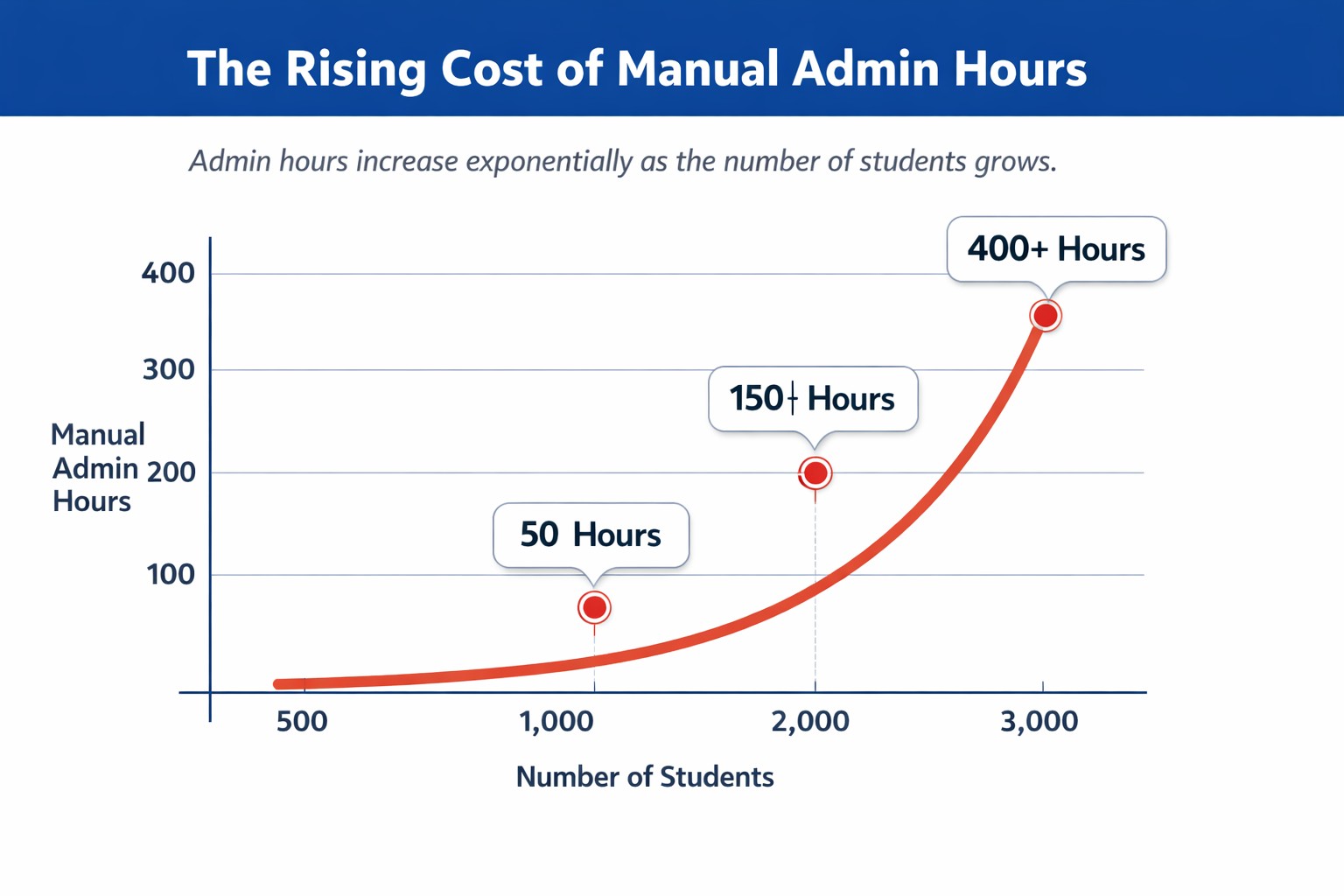
Let’s look at the math of the Franken-stack for a business with 3,000 students.
- The “Data Transfer” Tax
Every time a new student registers via Google Form, a human admin typically performs this workflow:
-
- Check the daily Google Form submission sheet.
- Verify if the payment screenshot matches the bank statement (Manual Reconciliation).
- Create an invoice in a separate accounting tool (like QuickBooks/Tally).
- Add their email to a Mailchimp list.
- Add them to a Google Classroom.
- Send them a welcome WhatsApp with their schedule.
“At one point, I realized I was personally approving invoices at 1:30 a.m. for a business that was supposedly ‘scaling.’ That’s when this broke for me.”, Founder of a large Japanese Language learning school
- Time cost: Approx. 15 minutes per student.
- Scale cost: 3,000 students x 15 mins = 45,000 minutes (750 hours/year).
- Financial Loss: At $20/hour, you are burning $15,000 annually just on copy-pasting data.
- The Revenue Leakage Tax
When your attendance tracker (Excel) isn’t talking to your billing system (Bank/Stripe), you lose money.Scenario: A student pays for 10 classes. They attend 12. The teacher marked it in their personal log, but the “Admin Sheet” wasn’t updated. The tutoring business just gave away 20% of their product for free.
In an audit of manual tutoring agencies, we often find 5-10% revenue leakage. On a $1M revenue, that’s $100,000 lost simply because your spreadsheet didn’t update. We’ve seen this again and again across language schools, test-prep centers, and even chess academies. Manual data entry creates a significant “hidden cost” of human error that erodes profit margins.
Comparison: Manual Management vs. Dedicated tutoring software
| Feature | Manual “Franken-stack” (Excel + WhatsApp) | Dedicated Tutor Management Software |
| Registration | Manual data entry from Forms | Automated Enrollment |
| Payment Collection | Chasing invoices via text/email | Auto-debit & Prepaid Credit System |
| Attendance | Teacher fills Google Sheet (Error-prone) | Automated via Zoom/Live Class Integration |
| Data Security | High Risk (Teachers have phone numbers) | In-app Secure Chat |
| Scalability | Linear (More students = More admin staff) | Exponential (More students = Same admin staff) |
Chapter 2: Automating Student Registration & Enrollment for Tutoring Agencies
The Holy Grail of tutoring operations is Zero-Touch Admin: The ability for a student to register, pay, receive their schedule, and join their first class without you or your staff lifting a finger.
Phase 1: The “Live” Inventory registration widget
Stop using static forms. A Google Form will accept a registration even if the class is full. You need a dynamic registration system embedded on your site.
- Inventory Check: It should only show classes with open seats. If “Beginner Japanese” is full, the form auto-hides it or offers a Waitlist.
- Prerequisite Logic: If a student selects “Advanced,” the system requires an uploaded certificate before payment.
Phase 2: The “Gatekeeper” Payment Integration
Key Rule: Never accept a registration without a payment.
- Checkout Flow: The student selects the course -> enters details -> pays via the payment gateway integrated with the tutoring software immediately
- Auto-Invoicing: The system generates a GST/VAT-compliant invoice and emails it instantly. No human finance team needed.
Phase 3: The Dashboard experience
Once paid, the student logs into their branded dashboard.
- They see “Next Class: Tuesday 4 PM.”
- They click “Join Class.”
- The system checks: Is this student active?
- If yes, it launches Zoom.
“Wise gave our SAT/ACT tutoring business a proper student portal for the first time – no more scattered Zoom links, emails, or homework updates. Everything’s centralized, from schedules and chats to session recordings. Built-in Zoom, tutor alerts, and internal messaging save our admins hours weekly.” Sean, founder of Pivot Tutos, a Test Prep based in San Diego, USA
Chapter 3: Preventing revenue leakage in Tutoring Businesses
There is nothing more demeaning or time-consuming than acting as a debt collector for your own educational institution.
The Problem with Post-Paid operations
Many tutoring centers invoice at the end of the month based on classes taken. This is a disaster for cash flow. You are effectively giving an interest-free loan to your customers.
Shift to a Pre-Paid Credit model.
- How it works: Student buys 10 “Class Credits.”
- Automation: Student joins a class -> 1 Credit is deducted instantly.
- Renewal: When they hit 2 credits, the system auto-emails them a payment link.
- Zero Debt: If they hit 0 credits, the “Join Class” button is disabled.
Automating Refund & Cancellation Policies
A student cancels 4 hours before class. Do they get a refund?
Automate the Policy:
Set your rules in your software (e.g., “Cancel >24hrs = Auto-Credit. Cancel <24hrs = Forfeit”).
When a student cancels in their dashboard, the system applies the logic. No emails. No “Please make an exception.”
Chapter 4: Quality control for online tutoring agencies
When you are small, you know if a teacher is good because you can hear them teaching. When you have 50 teachers teaching remotely, how do you know if quality is slipping?
1. The tutor assistant (AI Summaries)
You cannot sit in every Zoom class, but your software can. Advanced tutoring software use AI to transcribe and summarize classes.
- Audit Logic: You can scan 50 class summaries in 20 minutes to see if teachers are following the syllabus or chatting about irrelevant topics.
2. Verified Attendance & punctuality
- Login Logs: Your system should flag any teacher who joins <5 minutes before the start time.
- Duration Tracking: Did a 60-minute class end in 45 minutes? The system flags this anomaly for review.
3. Automated Feedback Loops
Don’t wait for a student to quit to find out they were unhappy.
- Micro-Feedback: After every session, the dashboard prompts: “Rate your experience.”
- Leaderboards: Track your best-performing teachers based on retention and ratings.
Chapter 5: Data Security & Privacy for Tutoring companies
The Scenario:
Your star teacher has a WhatsApp group with his 50 students. He builds a great rapport. One day, he decides to start his own agency. He sends one message to that group: “Hey everyone, join my personal class for 20% off.”
You just lost $50,000 in revenue. Furthermore, using consumer apps for student communication often violates COPPA and data privacy regulations, putting your institution at legal risk.
This video explains the three risks of using WhatsApp tutor-client communcation
The “Walled Garden” Strategy
To secure your business valuation, you must own the data.
- In-App Chat: Students and Teachers chat inside your branded app.
- Phone Number masking: The student never sees the teacher’s phone number. The teacher never sees the students.
- Audit Logs: Admin can view all chat logs. Poaching attempts are detected instantly.
Chapter 6: Why Wise is the Best Tutor Management Software for Scaling
We have talked about the theory. Now let’s talk about the tool.
Wise wasn’t built for generic “coaching.” It was built for the complexities of scaling tutoring businesses.
- Deep Zoom Integration: Wise tracks attendance and create recordings automatically. No separate Zoom admin account needed.
- Audio & Language Tools: Perfect for all types of tutoring businesses. Students can upload audio/text/video homework for pronunciation checks.
- White-Label Mobile App: Your logo on the App Store. Parents trust a professional institute app, not a generic tool. Your tutroing business grows faster
- Dedicated Client and Tutor portal: Students see upcoming sessions, invoices, etc on the their dashboard. Tutors can easily track their sessions, payroll and tasks.
Conclusion: Automate your admin, Start scaling
Transitioning to a dedicated Tutor Management Software isn’t an “expense.” It’s an infrastructure investment that pays for itself in:
- Recovered Revenue: No more missed payments.
- Saved Labor: 750+ admin hours reclaimed per year.
- Asset Protection: Owning your data.
Ready to dismantle your Franken-stack? Book a Free Demo with Wise.Live today and let us show you how to automate your education empire.
Frequently Asked Questions
Q1: What is the difference between an LMS and Tutor Management Software?
An LMS primarily hosts content. Tutor Management Software handles the business logic: Scheduling, Payments, Live Classes, and Payroll.
Q2: How hard is it to migrate from Excel?
Very easy. Wise offers bulk upload tools. You can move 3,000 students in an afternoon using our templates.
Q3: Is my data safe?
Yes. You own your data. Wise uses AWS encryption. You can export everything at any time.
Q4: Can I use wise it for in-person tutoring?
Yes. Wise manages physical classrooms and online links in the same calendar.